Quick Overview (What Changed in WhatsApp?)
WhatsApp has rolled out a major update in 2026 that focuses on making the app more useful in daily life.
Here’s what’s new:
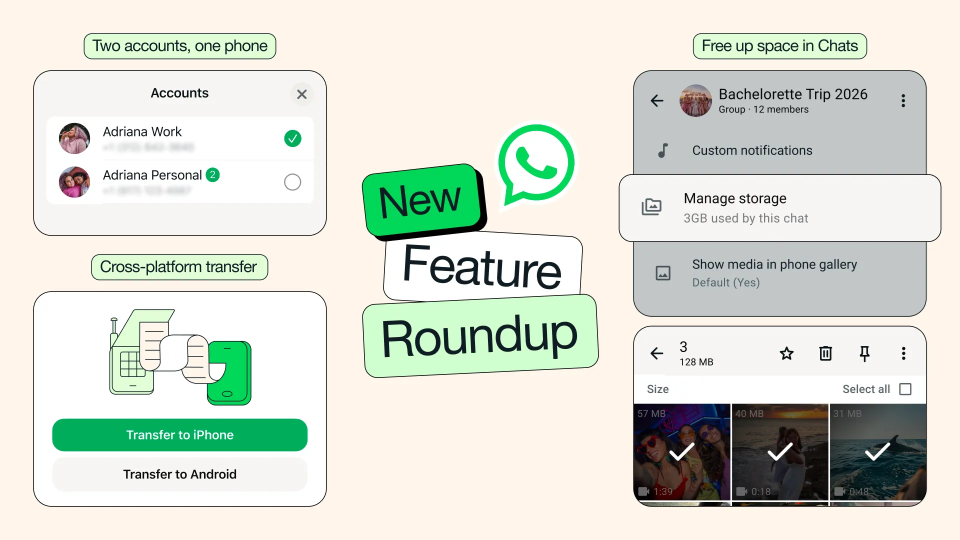
- Better storage management (delete large files easily)
- Cross-platform chat transfer (iPhone ↔ Android)
- Multiple accounts on one phone (now on iPhone)
- AI-powered photo editing
- AI writing assistance (smart replies)
- Smarter sticker suggestions
👉 These updates are designed to solve real problems users face every day.
Why This Update Matters
If you’ve been using WhatsApp for a long time, you’ve probably faced issues like:
- Storage getting full because of photos and videos
- Difficulty switching phones without losing chats
- Managing work and personal chats separately
- Spending time editing photos or typing replies
This update directly addresses these problems.
In simple terms, WhatsApp is now:
- More organized
- Smarter with AI
- Easier to manage
🚀 Complete Breakdown of New WhatsApp Features
1. Free Up Storage Without Deleting Chats
One of the most practical updates in this release.
🔍 What’s the problem?
Most users run out of storage because of:
- Photos
- Videos
- Forwarded media
Earlier, you had to delete entire chats to free space.
✅ What’s new now?
- You can delete large files directly inside a chat
- Option to remove only media (not messages)
- Keep important conversations safe
How to use it (Step-by-Step)
- Open any chat
- Tap on the contact or group name
- Select Manage Storage
- Review large files
- Delete only what you don’t need
Real-life benefit
In my experience, this is one of the most useful features because:
- You save storage without losing chats
- You don’t have to manually search for large files
- It saves time and effort
👉 Especially helpful if you are part of many groups.
2. Cross-Platform Chat Transfer (iPhone ↔ Android)
Switching phones used to be complicated.
🔍 What was the problem?
- Moving from iPhone to Android was difficult
- Chats, photos, and videos could get lost
✅ What’s improved?
- Transfer chats between iOS and Android
- Includes messages, media, and history
- Simple process with minimal steps
🛠️ How it works (Basic idea)
- Install WhatsApp on new device
- Follow transfer prompts
- Complete setup
💡 Real-life benefit
This is very useful if:
- You upgrade phones frequently
- You switch from Android to iPhone (or vice versa)
👉 No need to worry about losing your chat history.
3. Two WhatsApp Accounts on One Phone (Now on iPhone)
This feature already existed on Android, but now it’s available for iPhone users too.
🔍 Why this matters
Many people:
- Use WhatsApp for work
- Also use it for personal communication
Earlier:
- You needed two phones
- Or had to log in/out repeatedly
✅ What’s new?
- Use two accounts on one device
- Easily switch between them
- Profile picture shows active account
💡 Real-life use case
- Business account → clients
- Personal account → friends/family
👉 This makes daily communication much easier.
4. Smarter Sticker Suggestions
WhatsApp is improving how you express emotions in chats.
✅ What’s new?
- Stickers are suggested automatically
- Based on the emoji you type
🧠 Example
If you type:
- 😂 → funny stickers appear
- ❤️ → love-related stickers
💡 Why it matters
- Faster responses
- More expressive chats
- No need to search manually
5. AI Photo Editing (Meta AI Integration)
This is one of the biggest updates in terms of innovation.
🔍 What you can do
- Remove unwanted objects
- Change background
- Apply creative styles
🛠️ How it works
Before sending a photo:
- Open edit options
- Use AI tools
⚠️ Important
- This feature may not be available to all users yet
- Rollout is gradual
💡 Real-life benefit
Instead of:
- Using third-party apps
- Editing photos separately
👉 You can do everything inside WhatsApp.
6. AI Writing Help (Smart Replies)
WhatsApp is now helping users write better messages.
What’s new?
- Suggests replies based on conversation
- Helps improve tone and clarity
🧠 Example
If someone sends:
“Can you send the report by today?”
WhatsApp might suggest:
“Sure, I’ll send it by evening.”
🔒 Privacy Note
WhatsApp states:
- Messages remain private
- AI does not compromise chat security
💡 Real-life benefit
- Saves time
- Improves communication
- Useful for professional conversations
Pros & Cons of WhatsApp 2026 Update
✅ Pros
- Better storage management
- Easier phone switching
- AI features save time
- Multi-account convenience
❌ Cons
- Some features may not be available immediately
- AI suggestions may not always be perfect
- Learning curve for new users
Who Should Update Immediately?
- Users facing storage issues
- People switching phones
- Professionals managing multiple chats
- Users interested in AI features
Who May Not Notice Big Changes?
- Users with minimal WhatsApp usage
- People who don’t share media frequently
Related Guides
- Fix Bluetooth connectivity issues in earbuds
- Best earbuds under ₹5000 in India
- Best earbuds for calling
Final Verdict
The 2026 WhatsApp update is focused on practical improvements rather than just new features.
It improves:
- Storage management
- Device switching
- Daily communication
- Productivity with AI
If you use WhatsApp regularly, this update will make a noticeable difference in your daily usage.
FAQs
Q1. What are the new WhatsApp features in 2026?
Storage management, AI tools, multiple accounts, and cross-platform chat transfer.
Q2. Can I use two WhatsApp accounts on iPhone?
Yes, the latest update supports multiple accounts on iOS.
Q3. Is WhatsApp AI safe?
WhatsApp claims chats remain private while using AI features.
Q4. How do I free up WhatsApp storage?
Open chat → Manage Storage → delete large files.
Authority Note
This guide is based on official WhatsApp updates and real-world usage scenarios to help users understand how these features work in daily life.