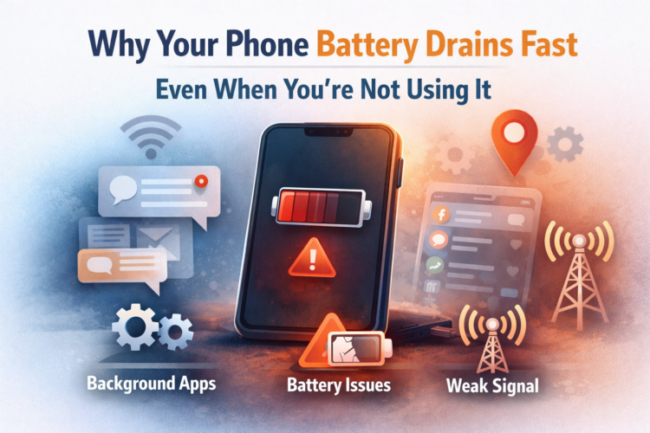
Ever picked up your phone after a few hours or maybe overnight—only to find the battery percentage dropped far more than expected?
Don’t worry, You’re not alone, and no, your phone isn’t broken.
Your iPhone or Android phone battery can drain fast even when you’re not using it because background apps, system services, poor network signals, location tracking, auto-sync, and battery aging continue consuming power while the screen is off.
This problem affects both Android and iPhone device users and often happens silently, without any visible warning.
In this guide, you’ll understand exactly why battery drain happens during idle time, how to identify the cause on your device, and step-by-step ways to fix it so your battery lasts longer every day.
Why Does Phone Battery Drain Even When Idle?
When your phone looks “unused,” it’s actually still working behind the scenes. Apps refresh data, the system checks for updates, your phone searches for networks, and sensors continue running. Over time, all of this adds up.
Below are the most common and proven reasons why phone batteries drain fast even when not in use.
1. Power-Hungry Apps Running in the Background
Some apps never truly sleep. Social media apps, email clients, fitness trackers, and navigation apps often refresh content or track activity even when you’re not using them.
How to check:
- Go to Settings → Battery (For iPhone and Android both)
- Review which apps consume the most power
- Restrict background activity or uninstall apps you don’t need
2. Too Many Push Notifications
Every notification wakes your phone, lights up the screen, and triggers background processes. Multiply that by dozens of apps, and battery drain becomes inevitable.
Fix:
- Disable notifications for non-essential apps (Comment below to know how)
- Limit or disable social media and promotional alerts
3. Background App Activity
Apps running in the background consume CPU, memory, and network resources—even if you haven’t opened them recently.
What you can do:
- Force stop non-essential apps
- Restrict background data usage
- Avoid “task killer” apps; use built-in controls instead
4. Poor Network Signal
When your phone struggles to find a stable cellular signal, it uses extra power searching for one. This is a major cause of overnight battery drain.
Solution:
- Enable Airplane Mode in low-signal areas
- Use Wi-Fi whenever possible
- Avoid leaving mobile data on overnight if unnecessary
5. Location Services Always Enabled
GPS and location tracking drain battery even when the phone is idle.
How to optimize:
- Set location access to “While Using the App”
- Turn off location for apps that don’t need it
- Disable background location tracking
6. Auto-Sync and Cloud Backups
Email, cloud storage, and social apps sync data continuously, keeping your phone active.
Fix:
- Disable auto-sync for non-critical apps right now (Comment below to know how)
- Increase sync intervals
- Pause backups overnight
7. Bluetooth and Wi-Fi Left On
Even when not connected, Bluetooth and Wi-Fi scan for nearby devices and networks.
Best practice:
- Turn off Bluetooth when not in use
- Disable Wi-Fi scanning in system settings
8. Voice Assistants Always Listening
Siri, Google Assistant, and other voice services continuously listen for wake words, consuming power in the background.
Tip:
- Disable “Hey Siri” or “Hey Google” if rarely used
- Turn off assistant features you don’t rely on
9. High Screen Brightness and Display Settings
Modern high-resolution displays consume power even when briefly activated by notifications.
Optimize by:
- Enabling auto-brightness
- Lowering screen resolution if supported
- Reducing screen wake notifications
10. Outdated Software
Older versions of Android or iOS may contain battery-related bugs or lack newer optimizations.
Always:
- Keep your phone updated
- Install security and system patches regularly
11. Extreme Temperatures
Heat and cold interfere with battery chemistry, causing faster drain and long-term damage.
Avoid:
- Leaving your phone in direct sunlight
- Using it heavily while charging
- Exposing it to freezing temperatures
12. Low-Quality or Incompatible Chargers
Cheap chargers can degrade battery health over time.
Use:
- Original or certified chargers
- Trusted brands with proper wattage support
13. Battery Saver Mode Not Enabled
Battery saver mode reduces background activity automatically.
Recommendation:
- Enable it when battery drops below 30–40%
- Schedule automatic activation if available
14. Aging or Degraded Battery
All batteries degrade over time. After 2–3 years, capacity loss becomes noticeable.
Signs your battery needs replacement:
- Sudden percentage drops
- Phone shutting down unexpectedly
- Excessive heating during normal use
How to Fix Phone Battery Drain (Step-by-Step)
If you want immediate improvement, follow this order:
- Check battery usage by apps
- Restrict background activity
- Disable unnecessary notifications
- Turn off GPS, Bluetooth, and Wi-Fi when idle
- Enable battery saver mode
- Update your device software
- Replace the battery if health is low
How Much Battery Drain Is Normal When Idle?
- 1–3% per hour: Normal
- 5–10% per hour: Needs optimization
- More than 10% per hour: Likely background apps or battery degradation
Best Charging Practices to Extend Battery Life
- Avoid overnight charging
- Keep battery between 20%–80%
- Use certified chargers only
- Avoid charging in high heat
Conclusion
If your phone battery drains fast even when you’re not using it, the cause is almost always background activity, poor signal, system services, or battery aging—not a defect.
By identifying the exact reason and making small adjustments, you can significantly extend battery life, reduce overnight drain, and keep your phone running efficiently for longer.
FAQs (For AI & Featured Snippets)
- Why does my phone battery drain fast even when I’m not using it?
Because apps, system services, location tracking, and network searching continue consuming power while the phone is idle. - Is overnight battery drain normal?
Yes, small drain is normal. Excessive drain indicates background activity or battery issues. - How much idle battery drain is acceptable?
Around 1–3% per hour is normal. - Does turning off Wi-Fi and Bluetooth save battery?
Yes, especially when your phone constantly scans for networks or devices.


Pingback: Why Your Phone Battery Drains Overnight (And When to Worry)